- The Vibe Marketer
- Posts
- Ditch Canva & Photoshop. Create viral, creator-level thumbnails in 5 mins
Ditch Canva & Photoshop. Create viral, creator-level thumbnails in 5 mins
Create like a designer, build like a developer with these exact frameworks


Today's newsletter is sponsored by GoMarble.
You run ads. You're also drowning in dashboards. No clear answer for why ROAS dipped or which creative is dying.
GoMarble is an AI agent for paid media marketers. Ask questions in plain English. Get answers from your actual Meta & Google Ads data.
Hey Vibe Marketer,
What if your next thumbnail took 5 minutes and looked like you hired a designer?
What if your next lead magnet or landing page build didn't break halfway through?
What if your charts for data visualization actually made people stop scrolling?
I am not guessing. I am watching it happen. Three marketers from the vibe marketer’s community already cracked this.
Here's exactly what they are building:
1. Design viral-looking YouTube thumbnails with AI in <5 minutes
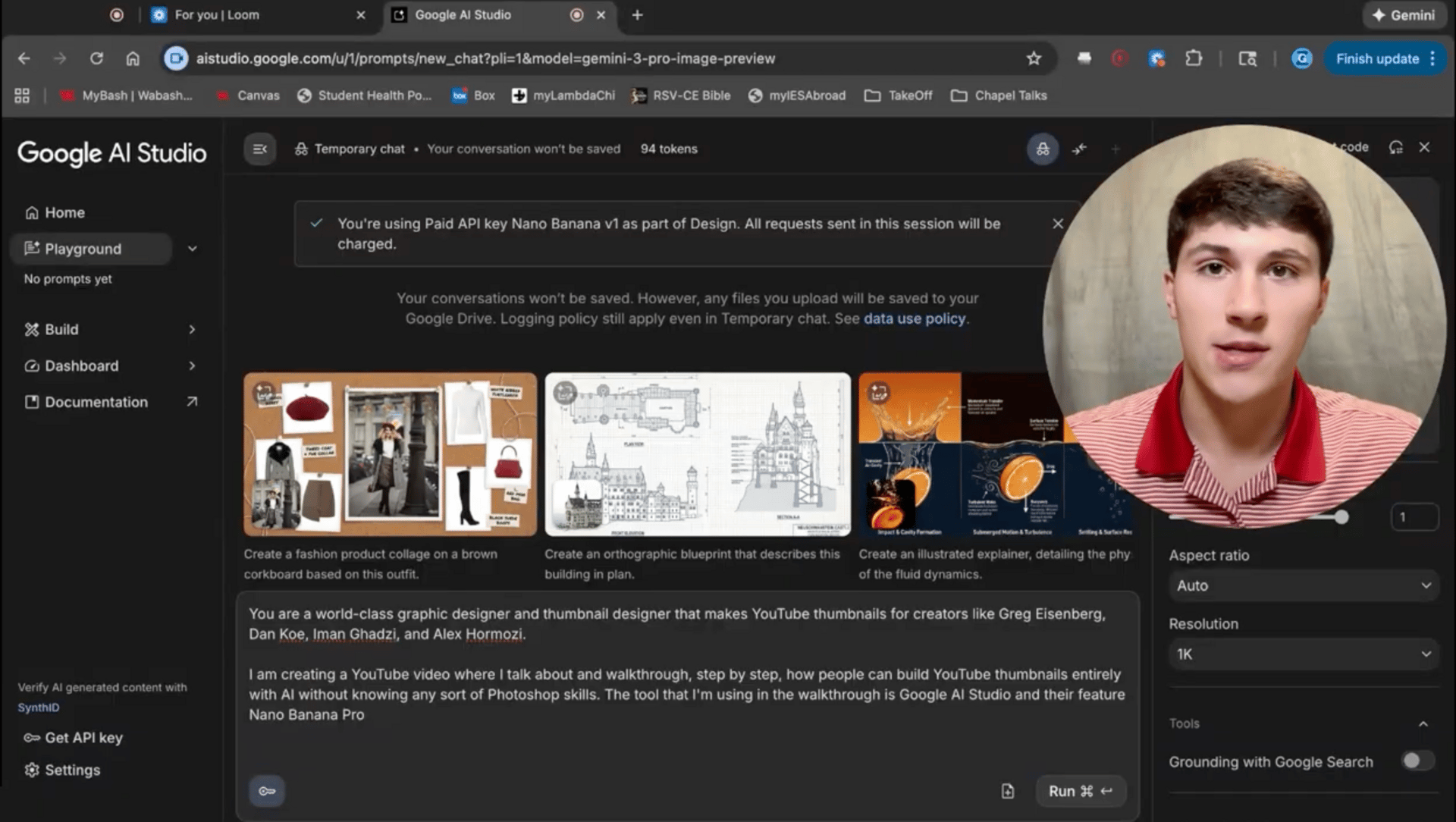
Thumbnails drive clicks on youtube. If they look generic or low-effort, the video dies before it starts.
Zach has created a stupidly simple way to generate creator-grade, “viral-looking” thumbnails using Google AI Studio + Nano Banana Pro in about five minutes without having to spend hours in Photoshop/Illustrator.
The exact workflow he used:
a. Set the role: Tell it who it is before you tell it what to do.This frames everything that comes after.
b. Describe your video: Give it context on what you're making the thumbnail for. Doesn't need to be a full script just the core idea.
c. Feed it creative assets: This is where most people stop too early. Zach loads it up:
Logo
Headshot of himself
His previous thumbnails (for style continuity)
More context = better output.
d. Add inspiration thumbnails: Find 3-5 thumbnails you'd actually click on. Zach pulled from Greg Isenberg and Dan Koe. Clean, bold, attention-grabbing.
The model learns the vibe from these. Skip this step and you get generic results.
e. Set the requirements: Be explicit about what you need:
Dimensions: 1280 x 720 pixels (16:9)
Face: Must look exactly like the headshot
Text: Tell it what you want it to say (don't let it freestyle it gets weird)
Result:
Publish-ready thumbnail
No Photoshop / Illustrator learning curve
Repeatable style across every video on your channel
Fast iteration loop (swap assets, tweak text, regenerate)
Consistent “creator-grade” look without a designer
2. Turn boring data into charts worth sharing

If you write data-heavy articles, you know the pain: You need charts to make numbers feel real. But, every chart tool gives you the same default outputs.
One of our community members, Max Bernstein is a ghost write for Jay Abraham and many others. And he kept running into the same problem: he needed charts that didn't look like boring Excel exports.
What started out as inspiration ended up in becoming a product called Chart Studio.
What Chart Studio actually does?
It turns your data into charts that actually look good. Three ways to use it:
1. Paste your data Copy from a spreadsheet, paste it in. It parses automatically.
2. Describe what you want Tell it what you're trying to show. AI builds the chart for you.
3. Paste a paragraph with numbers You have a block of text with stats scattered through it? Paste the whole thing. It extracts the data and visualizes it.
You can add brand colors. Pick from tons of different styles. Save charts to your account for later.
The part I like the most: He added personality to data more like data storytelling. There's a goofy owl mascot. The loading message says "Woah there, Picasso." The whole thing has a vibe that makes working with numbers actually enjoyable.
3. Vibe coding hack for marketers who ship
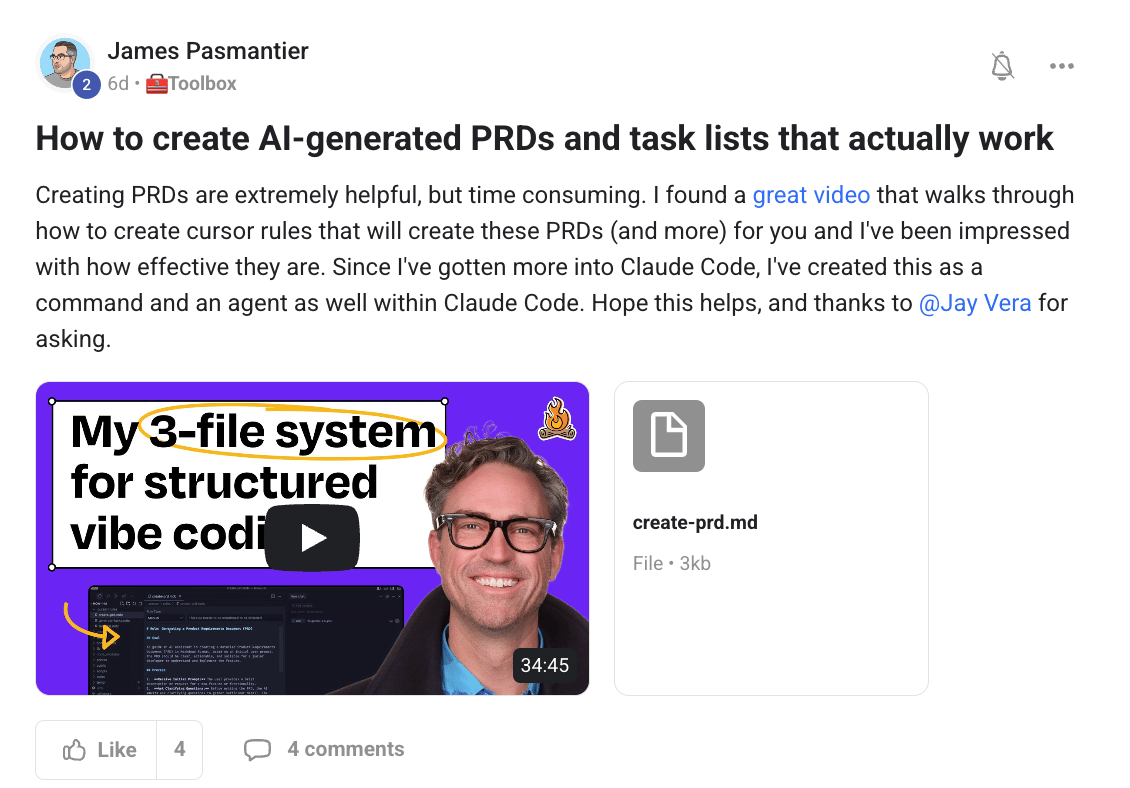
You have an idea for a landing page, a calculator, a simple tool. You jump into Claude Code or Cursor. Start prompting. It's working. Then it's not. You try to fix it. Now something else breaks. An hour later, you're staring at a mess you don't understand.
The AI isn't the problem. You skipped a step.
James Pasmantier just shared something that fixes this. He took Ryan Carson's PRD workflow and built it as a command inside Claude Code.
PRD = Product Requirements Doc. Sounds corporate. But here's what it actually does: it forces you to be clear about what you're building before you build it.
And clarity is what AI needs to not screw things up.
Here’s how it works:
Step 1: Describe what you want "I want a lead calculator that asks 3 questions and shows a price estimate."
Step 2: AI asks clarifying questions: What's the problem this solves for the user, Who's using it?, Where does it live standalone page or embedded? and What happens after they see the result? Now the AI actually understands what you're building.
Step 3: It generates a structured doc: Not code yet. A clear breakdown of what the thing does, what it doesn't do, and how it should work. Written so anyone (including AI) could build it.
Step 4: It creates a task list: Parent tasks. Subtasks. Checkboxes. The AI knows what to build first, second, third.
Step 5: It builds one task at a time: This is the part that saves you. It completes one thing, marks it done, then stops. You check it. Say "go." It continues.
No more AI trying to do everything at once and breaking your whole project.
Next time you're about to vibe code something bigger than a quick fix run it through this first. Your future self will thank you.

Let’s vibe
Join The Vibe Marketer’s Community where 2,900+ marketers, founders, and AI builders come together to:
Learn how to build real growth systems with AI
Get access to insider AI + Marketing frameworks and playbooks from experts
Hire or collaborate with the top 5% of vetted AI marketers
Be part of hot-seat strategy calls where I break down real business challenges
Got feedback or a question? Just hit reply. I read every message.
Know someone who’d love this newsletter? Share it with a friend who is figuring AI out too.
The Vibe Marketer
How'd you like this letter?Was this a vibe? |